Professional IT Services for Small Businesses

Using IT Consultancy to solve small business challenges.

When it comes to information technology it’s difficult to make sense of all the options open to you and most company owners or managers simply don’t have the time or interest to spend a week researching.

Choosing the right IT Consulting company in London or Kent or the wider UK takes away the gamble of what might do the job.

Making the right choices with your IT infrastructure, hardware, software and components means that day to day processes will be streamlined, the workload will be reduced and the end result will be an increase in profit.

Making poor choices with your IT can quite often mean that you end up with a few expensive door stops or shelf fillers that are a liability rather than an asset.

We’ve been working in the IT industry long enough to know what works and what doesn’t work and we certainly have the resources to find what it takes to get the results that you demand.

Our IT Consulting services will help you if you are:

  • Looking to resolve IT challenges within your business
  • Finding a way to save us time
  • Frustrated with long standing IT issues that others can’t fix
  • Moving office or expanding
  • Considering the cloud
  • Looking to see if your current IT setup is as cost effective as it could be

We work with small and medium sized businesses with between 5 and 100 users, and who are looking to ensure they are getting the most out of their tech resources. We are also able to provide IT Solutions, provide IT Help Desk Support and work with your specialist software providers to run new projects that may be outside their area of expertise, or which require extra manpower.


Book your free IT consultation

Book your free 20 minute consultation to discuss any IT issues, improvements or upgrades.
Or you may simply want a second opinion on a service that you have already.
Get in touch today.

A proper IT Cost Review is not just a quick look at invoices, it’s a structured way to understand what you’re paying for, what you actually use, and where money is being lost through duplication, waste, or outdated choices. We start by mapping your current environment, users, devices, subscriptions, and suppliers. Then we look for common cost leaks like unused Microsoft 365 licences, overlapping security tools, ageing hardware that is expensive to maintain, and broadband or cloud services that no longer fit the way your business works.

Cost reduction is only half the story. A good review also highlights risks that could become costly later, for example unsupported systems, poor backup coverage, or weak access controls. Cyber Essentials principles are useful here because they focus on practical baseline controls that reduce avoidable exposure.

Calculator and laptop for cost review
IT System Upgrades

IT Systems Upgrades are where planning pays off. Whether you are refreshing laptops, improving Wi-Fi, replacing a server, upgrading your network, or modernising a key business application, the goal is the same, better performance and reliability, with minimal disruption. We help you assess what needs upgrading now, what can wait, and what should be retired altogether. That means fewer surprise failures, fewer emergency fixes, and a smoother experience for your team.

We approach upgrades like a controlled change, define the outcome, confirm compatibility, test where possible, schedule around busy periods, and build a rollback plan. Security is built into the upgrade plan too. Keeping systems current supports the Cyber Essentials focus on security update management and secure configuration, and it reduces the risks that come with old, unsupported platforms.

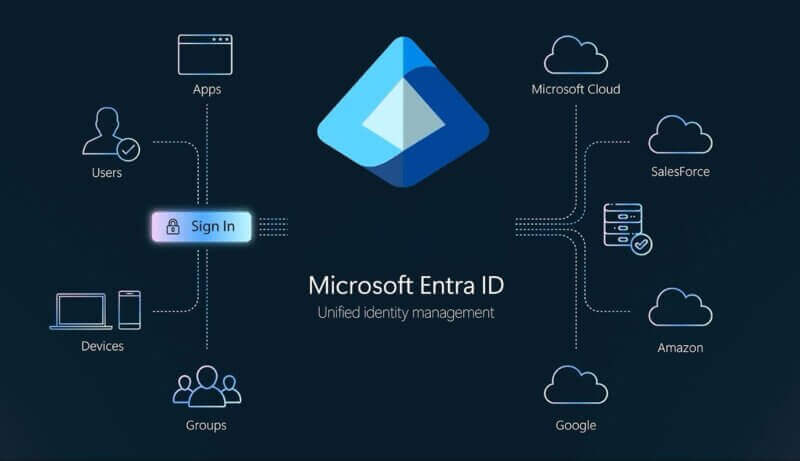
A well designed Microsoft 365 tenant setup is the foundation for secure email, collaboration, and identity management. If your tenant has grown organically, or was set up quickly during a busy period, it may be missing key security and governance basics. We help you set up Microsoft 365 properly from day one, or tidy up and standardise an existing tenant.

This typically includes creating the right structure for users and groups, setting up domains and DNS records, configuring Exchange Online, Teams, SharePoint, and OneDrive defaults, and establishing clear admin roles. Security is a core part of the setup. Microsoft recommends using security defaults or Conditional Access to enforce multi factor authentication in Microsoft 365, and the NCSC also highlights MFA as an important extra layer of protection for accounts.

Microsoft Entra ID Diagram
Business Continuity Plan

Business Continuity is about keeping your business moving when something goes wrong, whether that is a cyber incident, hardware failure, accidental deletion, or a major outage. The starting point is identifying what must be available for you to trade, for example email, phones, finance systems, shared files, line of business apps, and then defining realistic recovery goals. From there, we design a continuity plan that matches your size, risk, and budget.

Backups are only valuable if they restore, and ransomware has made that point painfully clear. Guidance like CISA’s StopRansomware resources recommends maintaining offline, encrypted backups and regularly testing restores so you know you can recover when you need to. We help you choose the right backup approach, document recovery steps, and run practical tests so recovery is not guesswork.

Microsoft 365 Optimisation is about getting more value, more security, and fewer headaches from the tools you already pay for. Many businesses use only a fraction of what Microsoft 365 can do, or they run into common issues like messy Teams sprawl, confusing SharePoint permissions, inconsistent OneDrive usage, and poor email hygiene. We help you simplify and standardise the way your organisation works in M365, so staff can find what they need quickly and collaborate without frustration.

Optimisation also means tuning your security posture. That can include improving MFA coverage, reducing risky legacy settings, tightening admin access, and putting sensible governance in place for sharing and retention. This aligns well with NCSC advice that emphasises practical steps for small businesses, and Microsoft guidance that encourages stronger authentication through security defaults or Conditional Access.

Microsoft 365 Apps Logos
Project planning

IT Projects and Planning turns “we should probably improve that” into a clear, deliverable plan. Whether you are moving offices, rolling out new devices, upgrading networks, adopting new software, or migrating to cloud services, the difference between a smooth project and a stressful one is usually scoping and coordination. We help you define what success looks like, translate it into requirements, and map out the steps, timelines, risks, and dependencies.

A good plan also includes communication, who needs to know what, and when, plus a realistic cutover approach to minimise downtime. We keep security and compliance on the agenda from the start so you do not finish a project only to discover you have created new risks. Cyber Essentials and NCSC guidance are useful reference points here because they encourage a consistent baseline, rather than one off fixes.

IT Procurement should be simple, transparent, and aligned to your actual needs, not driven by guesswork or whatever is on offer this week. We help you choose the right hardware and services for your business, covering laptops, desktops, servers, networking, firewalls, and supporting tools. The goal is to buy once, buy right, and avoid the hidden cost of mismatched equipment, poor performance, or devices that are hard to support.

Procurement is also a chance to improve standardisation, security, and lifecycle planning. For example, aligning device models and warranty terms makes support faster and reduces downtime. Choosing modern, supported systems supports the Cyber Essentials focus on secure configuration and update management, and it reduces exposure caused by ageing platforms.

Laptop Tablet & Phone
Email Migration

Email Migration is a high impact change because everyone uses email, all day, every day. Done well, it is calm and predictable. Done badly, it can mean missing messages, broken calendars, confused staff, and business disruption. We provide a structured migration to Microsoft 365 that protects continuity, keeps users informed, and avoids nasty surprises at go live.

We start with discovery, what platform you are on today, mailbox sizes, shared mailboxes, aliases, permissions, and any compliance needs. Then we plan the migration approach, for example staged migration, cutover, or hybrid, and we test thoroughly before switching. Security is also front and centre, migrations are an ideal time to enforce MFA and remove risky legacy settings, which Microsoft strongly recommends handling via security defaults or Conditional Access where possible.

Cloud Migration is more than moving servers, it’s a chance to modernise how your business works. When planned properly, cloud services can reduce maintenance overhead, improve resilience, and make it easier for teams to work securely from anywhere. When rushed, cloud projects can create downtime, unexpected bills, and data risk. We help you migrate with a measured approach that fits your priorities.

We begin with assessment, what you have, what you need, what is safe to move, and what should stay on premises for now. Then we design the target setup, covering identity, access controls, networking, backup, and monitoring. We also plan the migration path, pilot, data transfer, cutover, and post migration support. Security guidance for small organisations emphasises practical steps like strong access control and regular updates, and we bake those principles into the design.

Data storage drawer in a cloud
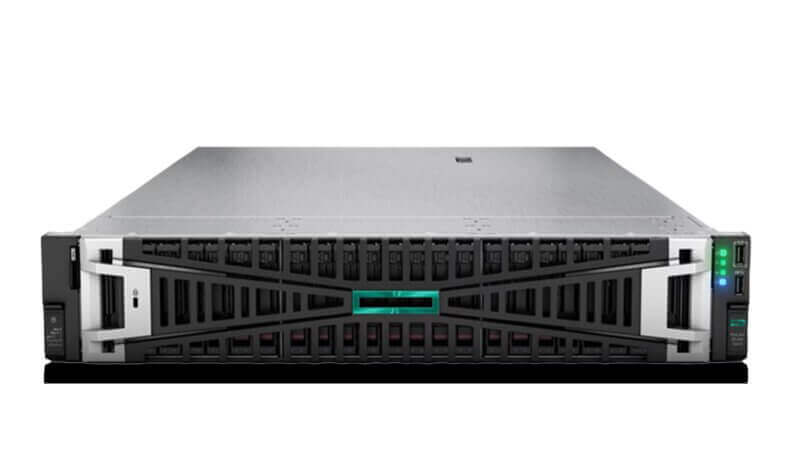
HP Proliant DL560 Server Gen11

Emergency Server Support is for the moments you cannot afford to wait, a server crash, failed updates, storage issues, authentication problems, or suspected security incidents. When a server goes down, productivity drops immediately and the pressure ramps up fast. Our focus is to stabilise the situation, protect data, restore service, and then identify what caused the incident so it does not happen again.

We follow a clear incident process: rapid triage, impact assessment, containment if security is involved, restoration, and then root cause analysis with recommendations. If recovery is needed, your backup and continuity plan becomes critical, and guidance like CISA’s ransomware resources reinforces why offline, tested backups matter in real world incidents.

Get in touch

Whether you’re looking for a new IT Support partner to provide IT Consultancy, have a major IT nightmare that needs resolving quickly, need a second opinion, or would just like to find out more about what we can help you with, we look forward to hearing from you.

Either fill out our contact form and we’ll get back to you by email.

Alternatively if you need help quickly, please call:

London 0208 123 0007

Or

Kent 01689 422522.

Or click for a free 20 minute IT Consultation.