



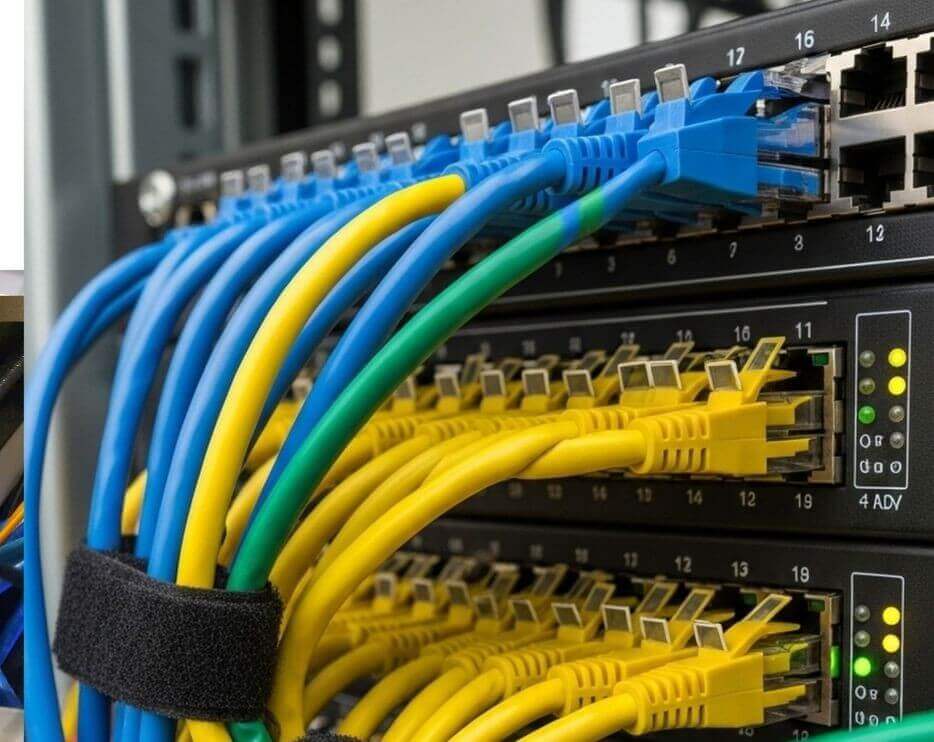
Comms – Data Cabinets
The Essential Guide to Proper Storage for Networking Equipment and Cable Patching
Data cabinets, also known as network cabinets or server racks, play a critical role in ensuring a stable, secure, and high-performing IT environment. As businesses rely more heavily on digital systems, cloud services, and uninterrupted connectivity, choosing the right data cabinet and implementing proper networking equipment storage and cable patching practices becomes essential. Well-designed cabinets not only protect valuable hardware but also support efficient airflow, simplify maintenance, and improve overall network reliability.
What Is a Data Cabinet and Why Is It Important?
A data cabinet is a purpose-built enclosure designed to house networking equipment such as switches, routers, patch panels, servers, and structured cabling. Available in wall-mounted or free-standing models, these cabinets standardise equipment organisation while improving network infrastructure performance.
Key benefits include:
- Physical protection: Prevents accidental damage, tampering, and dust build-up.
- Optimised airflow: Reduces overheating with proper ventilation and cooling options.
- Improved cable management: Keeps patch leads and structured cabling organised and easy to trace.
- Scalability: Allows room for growth within your IT infrastructure.
By centralising your essential hardware in a secure and organised environment, a good data cabinet becomes the foundation of reliable, future-proof network design.
Selecting the Right Network Data Cabinet
Choosing the best network cabinet involves assessing current equipment needs and planning for future expansion. Below are the most important factors to consider when selecting a cabinet for networking equipment storage.
1. Rack Size and U-Height
- Data cabinets are measured in rack units (U). Common sizes range from 6U wall cabinets to large 42U or 47U server racks.
- Ensure enough space for switches, routers, patch panels, and PDUs.
- Allow for future expansion to avoid costly upgrades later.
2. Cabinet Depth and Load Capacity
- Different devices have varying depths and weights. For example:
- Core switches may require deeper racks.
- Servers and UPS units demand higher weight capacities.
- Always ensure your server rack can support the heaviest equipment safely.
3. Ventilation and Cooling
- Proper airflow is essential for preventing downtime:
- Look for perforated front and rear doors.
- Add fan trays or top-mounted cooling where necessary.
- Leave adequate spacing around equipment to avoid hotspots.
4. Security Features
To maintain data integrity:
- Use lockable doors.
- Choose tamper-resistant fasteners.
- Install cabinets in restricted-access areas where possible.
Best Practices for Storing Networking Equipment in Data Cabinets
Organised and well-planned networking equipment storage improves system performance and simplifies troubleshooting.
Equipment Placement Guidelines
- Patch panels typically go at the top for easy access to structured cabling.
- Network switches sit just below patch panels to minimise patch cable lengths.
- Servers and heavy equipment should be mounted lower for stability and balance.
- UPS units usually sit at the bottom due to their weight.
This layout enhances airflow, reduces cable strain, and keeps patching neat and manageable.
Shelves and Mounting Rails
Non-rackable equipment should be stored using:
- Fixed shelves
- Sliding shelves
- Heavy-duty trays for larger appliances
This ensures proper support and easy access for maintenance.
Cable Patching and Cable Management Best Practices
Effective cable management is essential for maintaining a clean, efficient, and high-performing network cabinet. Poorly organised cabling leads to airflow blockages, increased troubleshooting time, and unnecessary downtime.
1. Label All Cables and Ports
Clear labelling is one of the most important steps in structured cabling. Labels help:
- Reduce errors during upgrades
- Speed up troubleshooting
- Maintain consistency across the network
2. Use Colour-Coded Patch Leads
Many IT teams use colour coding for quick identification:
- Blue for data
- Yellow for fibre and uplinks
- Red for security or firewalls
- Green for voice or PoE
This improves efficiency and reduces accidental disconnections.
3. Implement Proper Cable Management Tools
To keep your server rack cable management clean:
- Use vertical and horizontal cable managers
- Use Velcro straps instead of cable ties to avoid pinching
- Install brush strips to keep cables tidy at entry points
Good cable management optimises airflow and enhances durability.
4. Maintain Proper Bend Radius and Slack
Structured cabling must be installed with care:
- Never exceed the manufacturer’s bend radius
- Avoid stretching or pulling
- Leave enough slack for adjustments but avoid large, messy loops
This ensures signal integrity and prevents long-term cable damage.
5. Separate Power and Data Cables
To avoid electromagnetic interference:
- Keep power and data in separate routes
- Use dedicated PDUs
- Avoid running mains cables alongside sensitive data cabling
Looking for a company that can help with data cabinet setup
A well-designed data cabinet setup is essential for any modern IT environment. By selecting the right network cabinet, organising equipment effectively, and adhering to best practices for cable patching and structured cabling, organisations can significantly improve performance, reduce downtime, and ensure long-term network stability.
Get in touch
Whether you’re looking for a new data / comms cabinet installation or you need help with upgrading or fixing your current data cabinet, we’re here to help you, and we look forward to hearing from you.
Either fill out our contact form and we’ll get back to you by email.
Alternatively if you need help quickly, please call:
London 0208 123 0007
Or
Kent 01689 422522.
Or click for a free 20 minute IT Consultation.